
How to anchor topic clusters to pillar pages automatically
You publish a complete 10-article cluster, only to realize months later that half the posts sit orphaned while your primary pillar page flatlines. Manual spreadsheets and fragmented writing tools guarantee that internal linking breaks as your catalog expands.
Operating an AI SEO content engine solves this dilemma by embedding structured relationships during drafting instead of retrofitting them later. In this guide, you will learn how to build scalable topic clusters that systematically pass authority between hubs and supporting spokes.
Here is what this framework addresses:
- Eliminating orphaned spoke articles through programmatic context maps.
- Distributing link equity bidirectionally across your sitemap hierarchy.
- A subtle anchor-text distribution rule detailed below that shields your cluster from self-cannibalization.
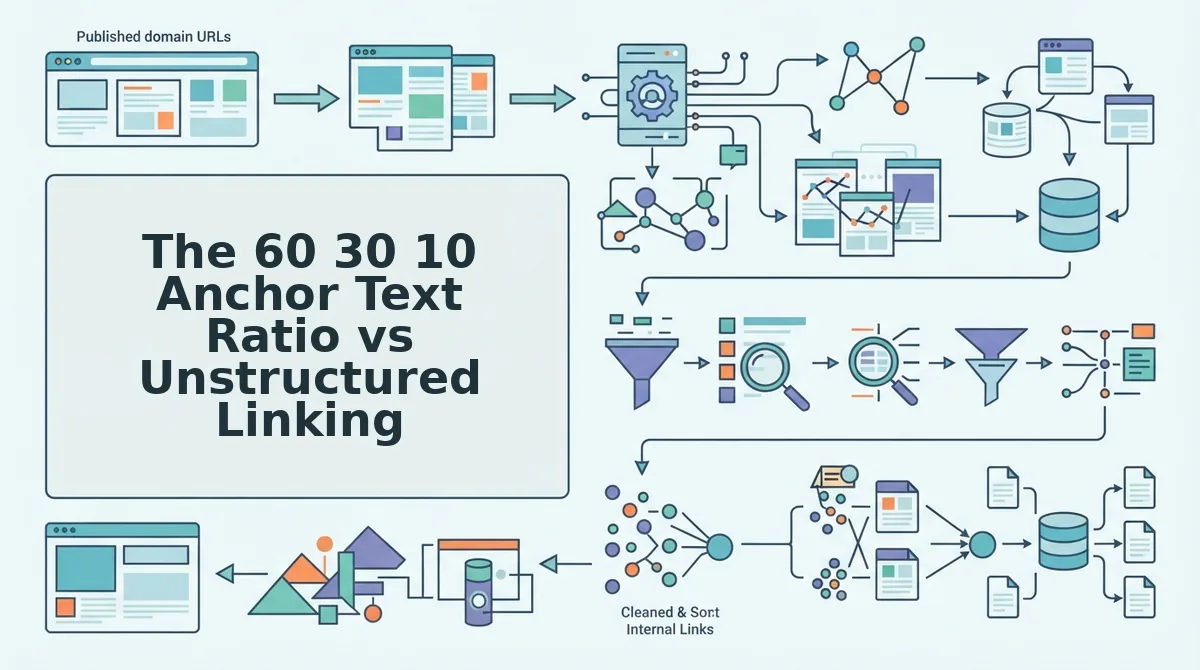
Consider a practical deployment: a publisher inputs their domain into a system that crawls their XML sitemap, reviews published pages, and generates an internal link map file. When drafting supporting subtopics, the engine consults this file and automatically injects contextual links pointing to the pillar page before publishing directly to WordPress. This process maintains tight link equity across new pages, though it requires clean sitemap accessibility rather than resolving legacy redirect chains.
What Is Topic Cluster Anchoring and How Link Flow Works
Topic cluster anchoring is the automated practice of connecting child cluster articles to a central pillar page using explicit semantic anchor text to route authority and crawl priority across a website. Instead of leaving informational articles isolated, this system establishes a two-way structural loop between core themes and granular subtopics.
Many publishers still fear that exact-match internal links trigger over-optimization penalties. That fear is unfounded: search engines do not penalize descriptive internal anchor text the way they penalize manipulative external backlinks. Generic anchors like "read more" or "click here" actively dilute search visibility by obscuring topical relationships from search crawlers.
Topic cluster anchoring is a structural linking architecture that binds specialized cluster articles to a high-level pillar URL through bidirectional hyperlinks. Think of a topic cluster like a metropolitan transit hub: the central train station represents your broad pillar page, while the commuter rail lines represent outbound links guiding visitors to specific neighborhood stations. In search engines, upstream links channel deep crawl equity upward, while downstream links distribute parent authority down to long-tail nodes. This deliberate flow prevents orphan pages, concentrates PageRank, and verifies topical completeness across every related URL in your domain hierarchy.
How does link flow move through this setup?
- Prerequisite structure: The site establishes an internal link map from sitemap crawl data, cataloging parent-child entity relationships before drafting begins.
- Downstream link distribution: The parent pillar passes authority down to specific cluster nodes through contextual links embedded in broad overview sections.
- Upstream equity return: Every granular cluster article links back up to the primary pillar URL with consistent, entity-defined anchors, solidifying the pillar's thematic depth.
- Horizontal peer discovery: Closely related subtopics cross-link sideways to validate search context without sending readers off-topic.
Automating this flow eliminates manual spreadsheet tracking and ensures every newly published piece reinforces the broader domain entity immediately.
The 60 30 10 Anchor Text Ratio vs Unstructured Linking
This structured distribution passes precise relevance to the primary pillar without triggering internal anchor stuffing or confusing crawler intent.
Why do exact-match anchors work wonders internally while destroying sites when used in external backlink profiles? Search engines evaluate first-party internal links as deliberate architectural signposts rather than third-party endorsement votes, meaning clear semantic anchors outline page relationships safely. The 60/30/10 anchor text formula is a structured internal linking model designed to distribute contextual relevance and search equity systematically from supporting cluster articles to a core pillar page.
| Linking Strategy | Topical Authority Signal | Setup Overhead | Best For |
|---|---|---|---|
| 60/30/10 Ratio Strategy | High; establishes primary keywords alongside semantic long-tail variants. | Moderate; requires anchor inventory tracking or automated context mapping. | Best for content publishers managing scaling clusters and automated pipelines. |
| Unstructured Linking | Low; diluted by ambiguous anchors like "learn more" or random phrases. | None; authors link organically without consulting a site taxonomy. | Best for solo bloggers running small, non-competitive hobby sites. |
| 100% Exact-Match Strategy | Moderate to high; reinforces single head terms but ignores topical breadth. | Low; relies on repeating identical target titles across every cluster post. | Best for micro-sites targeting isolated local search terms with under ten pages. |
Unstructured linking remains popular because manual platforms and multi-channel assistants like Jasper require no prior architecture mapping to generate prose. However, leaving anchors to chance creates topical dilution. When cluster posts link to a pillar using disconnected phrases, search bots struggle to identify which entity represents the definitive canonical resource.
Choose unstructured linking if you publish fewer than five articles a month and lack dedicated optimization tooling. Choose the 60/30/10 ratio if you manage comprehensive topical clusters where supporting guides must elevate a competitive head term while proving semantic depth.
Our recommendation is to enforce the 60/30/10 ratio across every cluster to maximize crawl equity. BloGoose automates this architectural balance by crawling your domain, compiling an editable internal-links-map.md, and inserting calibrated contextual anchors directly into drafts before publishing.
How to Anchor Topic Clusters to Pillar Pages Step by Step
To anchor topic clusters to pillar pages automatically, you extract your core URLs from an XML sitemap, map them to exact intent anchors in an internal linking configuration, and route bidirectional links between parent and child posts during generation. This structural linking passes search equity and reinforces topical authority across your entire domain.
An internal link map is a structured configuration file that maps canonical URLs to target anchor text variations across an entire website. Before starting this sequence, confirm you have an active XML sitemap and direct publishing access via your CMS or API.
Are you still tracking link paths across a sprawling fifteen-tab spreadsheet? Follow these four steps to eliminate manual link tracking:
- Parse pillar node URLs from your sitemap (Time: 2 minutes). Open your site setup screen and enter your primary domain to extract your live XML sitemap. The crawler identifies published cornerstone URLs and confirms them with a green checkmark next to your core taxonomy routes.
- Establish primary intent anchors (Time: 5 minutes). Select your pillar pages and assign primary intent anchor phrases alongside supporting synonyms within your internal link map file. This defines exact semantic signals so cluster articles link back using topical variations rather than repetitive, generic anchor text.
- Insert upstream links within the opening 200 words of cluster posts (Time: Automated). Configure your drafting rules to automatically place contextual hyperlinks targeting the pillar URL near the start of each supporting article. Your finished cluster draft displays an upstream contextual reference that anchors the child post to the parent topic immediately.
- Inject downstream links from the pillar to new nodes (Time: Automated). Connect your publishing endpoint so your pillar document automatically updates with an outbound link to the newly published subtopic node. The parent pillar renders an updated reference link pointing down to your new cluster asset.
Worked Example: Automating Internal Route Architecture
A content team relied on a manual spreadsheet with fifteen tabs to update links whenever a new subtopic went live. To remove this bottleneck, they completed the blog connection setup to crawl their sitemap and generate an editable internal-links-map.md file. When drafting cluster content, the engine referenced the markdown file to place upstream anchors in the introduction and inject return links on the pillar page. The team eliminated spreadsheet maintenance entirely while maintaining consistent, automated link architecture across both assets.
Stop fixing broken linking spreadsheets by hand. Connect your domain to BloGoose, an autopilot content engine that extracts brand context from your sitemap, maintains semantic internal links, and ships rank-ready articles directly to your CMS.
Core Rules for Lateral Linking Between Cluster Sibling Pages
Lateral linking between cluster sibling pages must follow strict unidirectional paths toward the next logical intent rather than cross-linking indiscriminately across the entire topic silo. Lateral linking is the practice of hyperlinking between child articles that share the same parent pillar page within an SEO topic cluster.
Linking every cluster post to every sibling creates a chaotic spiderweb that dilutes the main pillar rather than reinforcing it. Search crawlers calculate topical depth through hierarchical PageRank distribution. When child URLs loop excessively into each other, internal authority diffuses across minor entities instead of consolidating upward. To preserve structural equity, cluster sibling pages should anchor upward to the primary pillar first, passing horizontal equity only when search intent naturally cascades.
Are your cluster pages draining the ranking authority of your core hub?
- Enforce the 2-peer rule: Limit lateral internal links to a maximum of 1-2 complementary child posts that directly answer the next logical search intent. Uncontrolled horizontal links bleed link equity away from the pillar and confuse crawl bots evaluating topical hierarchies. Audit outgoing links in your CMS or site map before publishing to ensure each child article directs readers strictly to immediate next steps.
- Implement unidirectional intent progression: Connect sibling pages sequentially based on workflow stages rather than creating reciprocal, back-and-forth link loops. Two-way reciprocal links trap algorithmic crawlers inside isolated sub-loops instead of distributing PageRank across the broader topic cluster. Map sibling keywords into a linear prerequisite path within an internal link map file to guarantee links move in one direction.
- Sever lateral paths between parallel sub-branches: Prohibit horizontal connections between sibling articles that address alternate implementations of the same core problem. Forcing links between divergent subtopics blurs contextual boundaries, causing semantic engines to misinterpret keyword relationships. Keep parallel implementation variants completely isolated from one another, linking them exclusively upward to the central pillar hub.
- Position sibling links below the article mid-point: Place horizontal peer links exclusively within the bottom third of the article body or supplementary next-steps callouts. Search engines attribute higher contextual weight to links positioned near the top of a document, where pillar links belong. Configure CMS layout templates to reserve introductory sections exclusively for upward pillar anchors, leaving peer links for conclusion sections.
- Anchor peer links with contextual task phrases: Reference sibling articles using descriptive action phrases rather than exact-match target keywords. Using primary target keywords as sibling anchor text induces keyword cannibalization by signaling that two URLs satisfy identical search intents. Inspect anchor phrases against your target keyword list to verify that lateral links describe secondary downstream tasks.
How to Verify Your Cluster Anchoring and Crawl Coverage
To verify your cluster anchoring and crawl coverage, audit Google Search Console link reports and live DOM renderings to confirm search engine bots discover both your parent pillar link and lateral cluster connections within 48 hours of publication. Topical authority consolidates only when search crawlers successfully parse, fetch, and record these reciprocal hyperlinks.
URL Inspection is a diagnostic utility inside Google Search Console that checks how Googlebot crawls, renders, and indexes specific pages. Before testing your pages, ensure you have verified ownership of your Search Console property and have published at least one cluster spoke containing an anchored link to your pillar.
- Open the URL Inspection tool in Google Search Console by pasting the newly published cluster URL into the top search bar. This check takes approximately 30 seconds. You should see the current index status screen displaying whether the URL is on Google.
- Click the "Test Live URL" button located in the top-right corner to initiate a real-time fetch. Wait 1 to 2 minutes for the crawler to complete the test. You should see a green checkmark indicating the URL is available to Google.
- Select "View Tested Page", click the "HTML" tab, and search for your pillar page URL inside the rendered markup. This confirms your internal link exists in the rendered DOM rather than breaking behind uncrawled scripts. You should see your target anchor text and canonical href path present in the source.
- Prompt Googlebot to process new links immediately if the spoke has not been crawled. You can configure your publishing engine to ask Google to crawl new posts using automated Indexing API requests rather than waiting days for discovery loops. You should see bot crawl events recorded in your server logs within hours.
- Check the "Links" report in the left sidebar 48 to 72 hours after crawling, then filter by "Internal links". Search for your pillar URL under "Target page". You should see your newly anchored cluster post listed in the incoming internal links table, confirming that upstream equity has officially registered.
Did the link fail to register after three days? Inspect your canonical tags and server response headers immediately. Internal links placed on pages blocked by a noindex directive or caught in redirect loops will never pass topical equity upstream to your pillar page.
Frequently Asked Questions About Topic Cluster Anchoring
Automated topic cluster anchoring connects subtopic articles back to a core pillar page to centralize authority and maintain search rankings without manual link maintenance.
How many cluster articles should link to a single pillar page?
A standard topic cluster requires 6 to 15 supporting articles pointing to a single pillar page. This depth establishes topical authority across primary sub-intents without diluting crawl budget. Smaller sets under six pages lack topical breadth, while massive groupings over 15 articles should split into distinct secondary pillars.
Can automated cluster internal linking trigger a Google penalty?
Internal link over-optimization does not trigger algorithmic manual actions, but repetitive exact-match anchors degrade link equity and confuse entity resolution. Varying anchor text across broad phrases, partial matches, and conversational references protects internal link value while preserving natural crawl paths across the entire cluster structure.
Should a pillar page link back to every cluster article?
Pillar pages must link downstream to every supporting cluster page to complete the two-way semantic loop. Downstream linking ensures automated crawlers discover new child pages immediately. Maintaining a balanced distribution prevents orphan content and channels accumulated page authority back down into niche, long-tail subtopic queries.
How many horizontal links should sibling cluster pages share?
Restrict lateral links between sibling cluster pages to two or three hyper-relevant articles per post. Unregulated horizontal links create crawl loops and dilute focus away from the main pillar. Keep lateral architecture tight:
- Link only to direct contextual siblings.
- Cap lateral references at three per post.
- Always prioritize the vertical pillar link.
Turn Content Architecture Into an Autopilot Growth Asset
Automating your topic cluster architecture converts isolated articles into an interconnected equity network that signals unmistakable domain authority to search engines.
Topical authority is not built by publishing disjointed articles at volume, but by enforcing rigid architectural connections across every published page. Publishers running programmatic cluster structures sustain higher crawl frequency and retain topical visibility significantly longer than manual publishers managing ad hoc hyperlinks.
How do you transition from haphazard link additions to systematic cluster automation?
- Audit your XML sitemap to map existing orphan content against your central pillar URLs.
- Standardize cluster anchor text distribution across sibling nodes before drafting new material.
- Integrate link mapping directly into your publishing workflow so every new cluster asset references its parent pillar upon publication.
Drop your website domain into the BloGoose setup wizard to extract your site context, generate an automated internal link map from your sitemap, and ship fully anchored topic clusters directly to your CMS.
Search engines do not reward the sheer volume of content you publish, but the architectural clarity of the network that binds it together.