How an Autopilot SEO Content Platform Works
Your content stack has twelve tabs open: a SERP tool you pay for monthly, a chat window with a 4,000-word prompt document pasted into it, a separate image generator, and a spreadsheet where the calendar used to live. Those are not three problems. They are three symptoms of the same one â prompt chaining, tone drift, and tools that never hand data to each other.
An AI SEO content engine collapses all of it into one calendar, one publish path, and one review gate. Below is a stage-by-stage walkthrough of the autopilot SEO content platform category: what each stage ingests, what it emits, and which human signs off before anything ships. One finding along the way catches most operators off guard â the stage everyone assumes is fully automated is the one holding the tightest manual checkpoint, and it sits near the end, not the beginning.
Three prerequisites make any of it run: a crawlable XML sitemap, publishing access to WordPress or a custom API, and one named person accountable for the review gate. BloGoose reads the pages you have already published to extract brand voice rules, so setup is a crawl rather than a prompt-engineering project.
What is an autopilot SEO content platform?
An autopilot SEO content platform is a system that reads your existing website, holds a scheduled content calendar, drafts and optimizes articles, and publishes them to your CMS without a manual copy-paste step.
The short answer: it bundles three capabilities into one system â persistent site context learned from a crawl, a calendar that queues work on a schedule, and a publishing path wired to WordPress or a custom API. Take away any one of the three and you are left with a writing tool, not a platform.
Think of a chat subscription as a freelancer you brief from scratch every morning. A platform is a staff writer who has already read every page you have ever published â that stored context is what holds tone steady across thirty posts instead of drifting by post four. Context files are simply that stored knowledge, written to disk as structured markdown instead of living in a prompt window.
Run three checks before you trust the label:
- Does it read your site itself? Not a description of your site â the actual pages, their structure, their phrasing.
- Does it hold a calendar? A queue with dates and topics, not a blank text box waiting for inspiration.
- Does it publish? Direct to your CMS, or through a documented API, with no human ferrying drafts between tabs.
The word "autopilot" gets used loosely. Voxfor Autopilot arrives as a WordPress plugin, and RankPilot leads with demo footage â both lean on the same term with very different depths of machinery underneath. A plugin optimizes what you already wrote; a platform decides what gets written, then ships it.
For teams comparing categories: an autopilot platform differs from automated SEO content tooling in one measurable way â where the work starts. Automation tools begin at the draft. A platform begins at the crawl, which means the brief, the angle, and the internal links are informed by pages you have already published and already rank with. That upstream context is why output needs fewer rewrite passes, and why the calendar can be planned against topical gaps rather than keyword lists alone.
How an autopilot SEO content platform works, stage by stage
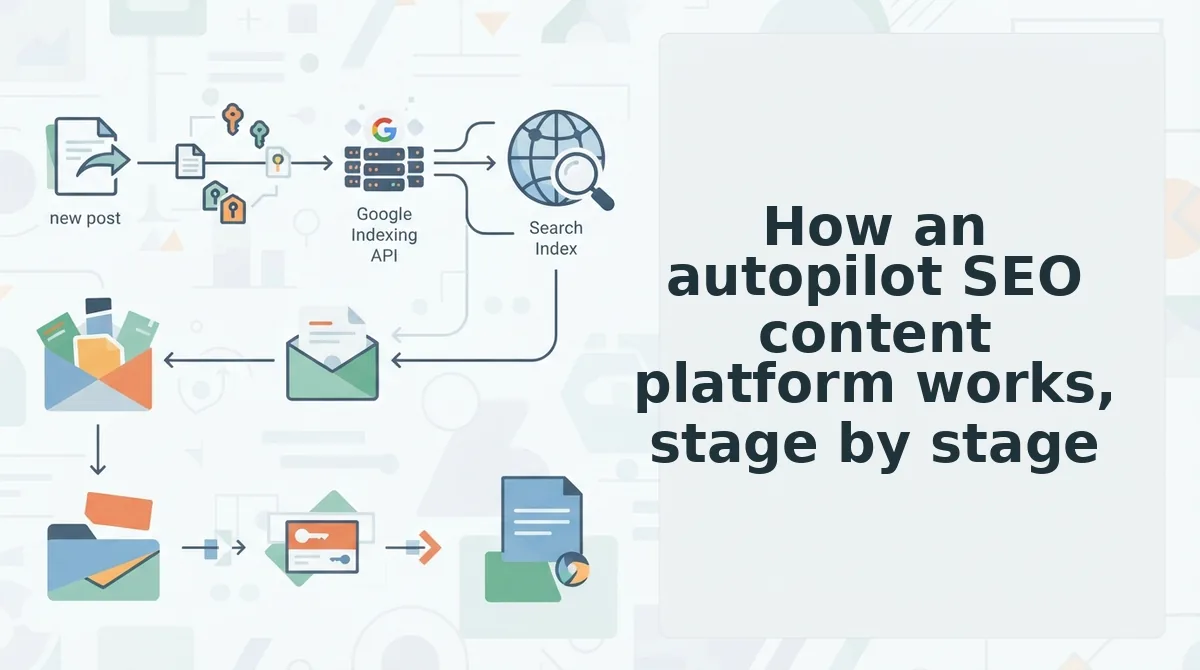
An autopilot SEO content platform runs a six-stage pipeline: crawl the site, write context files, research the SERP and social signal, build the calendar, draft with inline images, then publish and index. Each stage passes a named artifact to the next, and each has a human owner who signs off before the handoff.
Stage 1 â Crawl. Input: your domain. The system locates the sitemap, inspects published pages, and detects the underlying technical setup. Output: a page inventory. Owner: you, once, at setup â confirming the XML sitemap lists the canonical URLs you actually want modeled.
Stage 2 â Context files. Input: the inventory. Output: written brand rules â voice, structure, terminology, linking habits. Owner: an editor who diffs these against your style guide once, rather than re-pasting prompts every session.
Stage 3 â Research. Input: target topics. Output: SERP and social signal for each. This is the most fragile stage, because stale research is the single most common failure point in automated pipelines â a calendar planned on last quarter's results answers last quarter's intent.
Stage 4 â Calendar. Input: research plus context files. Output: a dated, pillar-focused queue. Owner: whoever owns the editorial plan, approving topics before drafting burns effort.
Stage 5 â Draft and inline images. Input: calendar entries. Output: the article plus its images in one pass. This is the handoff most multi-tool stacks break on, because text and visuals usually come from separate subscriptions with no shared context.
Stage 6 â Publish and index. Input: an approved draft. Output: a live URL on WordPress or your custom API. Publishing is where the quiet work lives: the platform pushes the finished piece through the same credentials your team uses, so the article lands with its metadata, internal links, and images intact, then enters the indexable surface of the site without a human re-uploading assets or re-checking slugs. Teams on Ghost or self-hosted stacks get the same path through the API rather than being locked to one CMS.
The loop closes here. That manual checkpoint near the end is stage 5 â the review gate, where unverified claims, cited statistics, YMYL statements, and final links get approved by a person. Full autopilot on that gate is a red flag, not a feature. Google's scaled content abuse policy turns on added value, and added value is precisely what a human check produces. BloGoose crawls your domain and generates those context files for you, which shortens stages 1 and 2 to minutes and leaves your attention where it earns the most: the gate.
Three moves from here. Confirm your sitemap is crawlable and lists canonical URLs. Name the single person who owns the publish gate, and write down what they must verify. Then drop your domain into the setup wizard and read the extracted voice rules before the first calendar generates â the gap between those rules and how you actually sound is the most useful thing you will learn about your own site this quarter.