
API vs Manual Content Publishing for Blog Posts
You've got 12 tabs open: one for research, one for your AI draft, one for your SEO checklist, one for WordPress, one for your image tool, and seven more you've forgotten why you opened. Every post takes an hour of copy-paste, reformatting, and metadata re-entry before it even goes live. The question isn't whether API vs manual content publishing for blog posts matters, it's how much time you're silently burning every single week.
Here's the direct answer: API publishing wins at scale, but manual publishing still makes sense below roughly 10 posts per month. Manual copy-paste into WordPress costs an estimated 8-12 minutes per post just in formatting fixes, while API publishing takes 30-60 seconds after initial setup. The break-even point is lower than most publishers assume.
You're right to feel the friction. Every content team hits this wall eventually, and the fact that you're asking means you've outgrown the copy-paste loop. In this article, you'll learn exactly what API publishing does under the hood, the five hidden costs of manual publishing nobody tracks, and how to decide which workflow fits your volume. Stick around, the setup cost of API publishing isn't nearly as intimidating as the forums make it sound, and one specific workflow detail will likely change how you think about your automated SEO content engine strategy.
What API Publishing Actually Does (and What It Doesn't)
API publishing is the process of creating, updating, and publishing blog posts on your CMS through a programmatic interface instead of logging into the admin dashboard and clicking through the editor. It handles draft creation, metadata assignment, image attachment, and scheduling, all without a single manual click inside wp-admin.
Think of API publishing like a restaurant's ordering system versus walking into the kitchen yourself. When you publish manually, you're the customer walking into the kitchen, finding the ingredients, chopping them, and plating the dish. API publishing is the waiter taking your order and the kitchen executing it, you specify what you want, and the system handles the mechanical steps consistently every time.
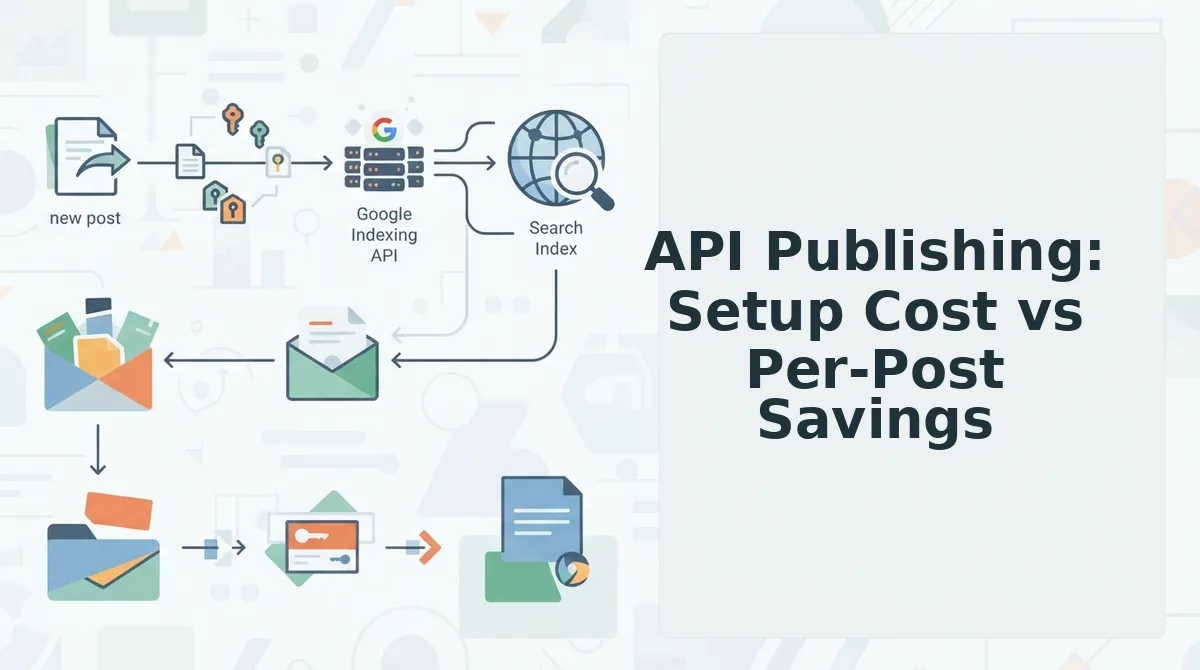
The WordPress REST API is the most common implementation. It lets external tools create, update, and publish posts without logging into wp-admin. A tool sends a structured request containing the post title, content, categories, tags, featured image, and publish status. WordPress processes that request and returns a confirmation with the post ID and URL. DAEXT's YouTube tutorial demonstrates publishing WordPress posts directly from Claude via the REST API, confirming this workflow is real, practical, and increasingly in demand among publishers who want to skip the dashboard entirely.
Here's what API publishing includes in practice: draft creation with full HTML content, metadata assignment for categories and tags, featured image upload and attachment, SEO fields like meta descriptions and focus keywords, and scheduled publication dates. What it doesn't do is write the content itself, make editorial judgment calls, or fix broken internal links, those still require a human or a content engine that handles them before the API call happens.
For a self-contained reference: API publishing sends structured data to your CMS endpoint, which validates and stores it as a post. The request typically includes the title, slug, content body, excerpt, author ID, categories, tags, featured image ID, and status field. The CMS returns a response confirming success or listing validation errors. This loop replaces the manual process of opening the editor, pasting content, fixing formatting, uploading images, setting metadata, and clicking publish, a sequence that repeats identically for every single post. If you're evaluating this workflow, the BloGoose API documentation shows how a content engine packages all of these fields into a single publish-ready request.
Manual Publishing: The Hidden Time Cost No One Tracks
Manual publishing looks free because there's no setup and no API key to configure. The cost hides in the five things that silently break every time you paste content into WordPress, and each one steals minutes you never account for in your content budget.
- Formatting drift destroys your heading hierarchy. When you paste from Google Docs, Notion, or a chat window, WordPress often flattens H2s into bold paragraphs or converts lists into run-on text blocks. You spend 3-5 minutes per post rebuilding the structure that your SEO strategy depends on, because search engines and AI answer engines both rely on clean heading hierarchy to parse content.
- Image alt-text vanishes on paste. Pasting content with embedded images frequently strips the alt attributes entirely. That means every image loses its accessibility value and its ranking potential in image search. Re-adding alt text manually for 5-10 images per post adds another 2-4 minutes, and most publishers skip it, silently hurting their image SEO best practices without realizing it.
- Block editor conversion errors create cleanup work. Gutenberg sometimes splits a single paragraph into three awkward blocks, inserts empty spacer blocks between sections, or converts a code snippet into plain text without syntax highlighting. Each error requires manual inspection and correction, and the errors are inconsistent enough that you can't automate the fixes with a simple find-and-replace.
- Internal link breakage goes unnoticed until it's live. Relative URLs from your source document, like
/blog/previous-post, may not resolve correctly after pasting into WordPress. A link that worked in your draft tool now 404s on the live site, and you won't catch it unless you click every link in preview mode. Broken internal links damage crawl efficiency and user trust simultaneously. - Metadata loss forces redundant data entry. Categories, tags, custom fields, and SEO metadata don't transfer when you paste content. You re-enter the same taxonomy selections and meta descriptions for every post, every time. At 8-12 minutes per post across 20 posts a month, that's 3-4 hours of pure data re-entry, time that an automated publishing workflow eliminates entirely.
These five costs compound with every post you publish manually. The next section breaks down whether the setup investment in API publishing actually pays off at your volume.
API Publishing: Setup Cost vs Per-Post Savings
API publishing is not faster for your first 10 posts. The initial setup, generating application passwords, testing authentication, handling schema mismatches, and managing draft-publish state errors, typically eats more time than it saves until you cross a monthly volume threshold.
School of Terence's YouTube tutorial on WordPress REST API publishing demonstrates exactly this barrier: you need Postman or a similar client just to verify your authentication token works before a single post goes live. That is real engineering time, not content time.
Once the pipeline is built, however, the per-post cost collapses. Manual publishing requires copy-pasting from a draft, reformatting in the block editor, re-uploading images, and fixing metadata on every single post. API publishing eliminates that loop entirely.
Break-Even Framework
The break-even point sits around 10 posts per month. Below that volume, manual publishing wins because setup overhead dwarfs per-post savings. Above it, API publishing compounds: the same pipeline handles 15, 30, or 100 posts with near-zero marginal effort.
| Factor | Manual Publishing | API Publishing |
|---|---|---|
| Initial setup time | None | Authentication, testing, error handling |
| Per-post time (after setup) | 15-30 minutes of copy-paste and reformatting | Seconds to minutes, no manual formatting |
| Error type | Random, per-post mistakes | Systematic, affects every post if uncaught |
| Scaling cost | Linear, more posts, more hours | Near-zero marginal cost |
| Break-even volume | Wins below ~10 posts/month | Wins above ~10 posts/month |
Worked Example: BloGoose Workflow
A content manager drops their domain into BloGoose, which crawls the sitemap, extracts brand voice rules, and generates a 30-day calendar. When they publish 15 posts via API, each article lands in WordPress with formatting, images, and metadata intact, no copy-paste, no formatting drift, no block editor conversion errors.
That same manager publishing 15 posts manually would spend roughly 5-7 hours per month on pure publishing mechanics. The API setup cost is paid back within the first month at that volume. For a solo blogger publishing 3 posts monthly, manual remains the rational choice, the setup is not worth it yet.
Best for solo bloggers and low-volume publishers: Manual publishing. You avoid setup complexity and keep full control over every formatting decision.
Best for content managers, agencies, and teams publishing 10+ posts monthly: API publishing via a tool like BloGoose. The setup cost amortizes quickly, and the per-post savings compound. If you are building the pipeline anyway, pair it with an SEO content brief generator to keep every post on-brief before it ships.
Speed vs Accuracy: The Trade-off Nobody Mentions
API publishing is faster but errors are systematic, one bug affects every post. Manual publishing is slower but errors are random and easier to catch before publication.
The distinction matters because the two failure modes demand different defenses. A systematic error in your API pipeline, an expired authentication token, a schema mismatch, or a draft-publish state bug, will silently corrupt or block every post until you notice. A random manual error, forgotten alt text, a broken internal link, affects one post and is usually caught in review.
Failure Mode Comparison
| Error Type | API Publishing (Systematic) | Manual Publishing (Random) |
|---|---|---|
| Authentication | Token expiry blocks all posts until renewed | Not applicable |
| Structure | Schema mismatch corrupts every post identically | Formatting drift varies per post |
| State management | Draft-publish errors affect entire batch | Individual posts published too early or late |
| Content integrity | Consistent but wrong if pipeline is wrong | Image alt-text loss, block editor conversion errors, metadata loss |
| Detection | Harder to spot, everything looks the same | Easier to spot, each mistake is unique |
API publishing demands a validation step before you trust the pipeline. Run one test post, inspect it in the editor, and only then enable batch publishing. Manual publishing demands a checklist instead, alt text, internal links, metadata, formatting, applied to every post individually.
For teams publishing structured, repetitive content at volume, the systematic risk is manageable with a single validation pass. For teams producing long-form, custom-formatted pieces, the random error rate of manual publishing is the lesser evil because each post gets individual attention anyway.
Best for high-volume teams with technical oversight: API publishing through an automated publishing engine, validate once, then scale.
Best for low-volume publishers with bespoke formatting needs: Manual publishing with a pre-publish checklist.
The 5-Question Decision Matrix
Score yourself on five questions, 1 to 3 points each, then match your total to a publishing method. Total scores of 5-8 point to manual publishing, 9-12 to a hybrid approach, and 13-15 to API publishing.
- Team size. Solo operators score 1, small teams score 2, and large teams score 3. Larger teams benefit more from API publishing because the pipeline removes coordination overhead across multiple contributors.
- Publish volume. Under 5 posts per month scores 1, 5-15 posts scores 2, and over 15 posts scores 3. Volume is the single strongest predictor of whether API setup costs amortize.
- Technical comfort. No technical background scores 1, some familiarity scores 2, and high comfort scores 3. API publishing requires at least basic comfort with authentication and error handling, or a tool that abstracts it away.
- Content type. Long-form pieces with custom formatting score 1, mixed content scores 2, and structured or repetitive content scores 3. Structured content benefits most from automated pipelines.
- Error tolerance. Low tolerance scores 1, medium scores 2, and high scores 3. High tolerance means you can accept systematic errors being caught after batch publication rather than before.
Add your five scores. If you land in the 9-12 hybrid range, use manual publishing for flagship long-form posts and API publishing for structured, recurring content. Most teams start hybrid and shift toward API as volume grows.
Ready to see where your workflow lands? The next section answers the most common questions about making the switch.
FAQ
API publishing automates post creation through a CMS's REST endpoint, while manual publishing requires copy-pasting content into an editor. The right choice depends on publishing volume, technical comfort, and how much formatting consistency your workflow demands.
Can I publish WordPress posts from Claude via API?
Yes, using the WordPress REST API with an application password. DAEXT's tutorial demonstrates this workflow, which lets you send drafted content directly from Claude to WordPress without opening the block editor. Authentication takes minutes, and posts appear immediately after the API call succeeds.
Is API publishing worth it for a small blog?
Only if you publish more than 10 posts per month. Below that threshold, manual publishing is simpler and has lower setup cost. The 2-4 hour initial configuration only pays off when per-post time savings accumulate across enough volume to offset the upfront investment.
What breaks when you copy-paste into WordPress?
Formatting drift, image alt-text loss, block editor conversion errors, internal link breakage, and metadata loss. The block editor often reinterprets pasted HTML, stripping attributes or splitting paragraphs unpredictably. Each paste requires a visual QA pass to catch what silently changed.
How long does API publishing setup take?
Expect 2-4 hours for authentication, testing, and error handling, depending on your technical comfort. Most of that time goes to configuring application passwords, mapping content fields to your CMS schema, and building retry logic for failed requests. Subsequent posts require zero additional setup.
Why does my formatting change when I paste into WordPress?
The block editor converts pasted HTML into Gutenberg blocks, which strips unsupported attributes and restructures nested elements. Inline styles, custom classes, and image alignment often get lost. Pasting into the code editor instead of the visual editor preserves more markup but still requires manual verification.
The Real Decision Is About Failure Modes, Not Features
API publishing wins at scale, 10+ posts per month, but manual publishing wins for low volume. The deeper insight from this comparison is that the two approaches fail differently: API errors are systematic, meaning one misconfigured field affects every post identically, while manual errors are random, meaning each paste introduces unpredictable formatting drift. You are choosing which failure mode you can live with.
BloGoose eliminates both copy-paste errors and raw API setup friction by crawling your sitemap, extracting brand voice, and publishing directly to WordPress or your custom API. The platform handles authentication, field mapping, and error retries so you never touch an application password or a block editor conversion. Start by exploring the AEO optimization guide to see how published content gets cited in AI answers, or read how sitemap context extraction anchors content planning to your existing site structure.
Your next step is to count your actual monthly publishing volume. If it exceeds 10 posts, API publishing is no longer optional, it is the only workflow that scales without hiring a full-time content operations person. The tools exist to make that transition painless.