
Direct CMS integration vs Jasper for blog teams
Every month, your blog team burns 6 - 10 hours copying drafts out of a standalone AI editor, rebuilding headings, re-uploading images, and hand-keying title tags into WordPress, time that never shows up in a traffic report. If that routine sounds familiar, the real question isn't whether AI can write; it's whether direct CMS integration vs Jasper changes how much of your publishing loop stays manual.
You're right to be frustrated. Stack sprawl is real, and most "AI writing tools" stop at the document edge, leaving you to bridge the gap to your CMS by hand. This article will show you exactly where the two approaches diverge, from architecture to daily workflow, so you can decide which one actually removes operational drag instead of relabeling it.
We'll walk through how direct CMS integration compares to Jasper for publishing, break down the architectural difference between a standalone editor and a native publishing pipeline, and expose the hidden friction points in formatting, metadata, and image uploads. Along the way, one finding may surprise you: the bottleneck was never the writing quality, it's the transfer step most teams never measure. If you're evaluating an AI SEO content engine that ships finished articles straight to WordPress, keep reading.
How Does Direct CMS Integration Compare to Jasper for Publishing Blog Articles?
Direct CMS integration is a publishing architecture where an AI content engine writes, formats, and pushes a finished article, including HTML structure, metadata, and media, straight into your content management system's database, while Jasper operates as a standalone generative copilot that produces text you must manually transfer, reformat, and configure inside your CMS.
Think of it like the difference between a chef who plates the dish in the dining room versus one who hands you ingredients through a kitchen window. Both produce food, but only one removes the serving step.
The Simple Version
With Jasper, the workflow looks like this: prompt for a draft, copy the text, paste it into WordPress, reapply heading styles, upload images one by one, fill in the SEO title and meta description fields, set the slug, and hit publish. With direct CMS integration, you approve the article in one interface and the engine ships formatted HTML, metadata, and media to your CMS database automatically, no clipboard involved.
The Intermediate Version: A Worked Example
Consider an agency producing 20 monthly search guides for a DTC client. On Jasper, each article passes through at least four manual handoffs: writer exports text, editor reformats in Google Docs, VA pastes into WordPress and rebuilds headings, SEO specialist configures title tags and internal links. That's roughly 80 manual transfer steps per month before a single article ranks.
With a direct CMS engine, the pipeline collapses to one approval step. The engine crawls the client's existing site to extract brand voice, builds the article with internal links already mapped, and pushes structured content to the CMS via REST API or webhooks. The agency's only job is review and publish.
The Advanced Version: Where the Real Divide Lives
Direct CMS integration automates the pipeline from keyword research to published article, shipping formatted HTML, metadata, and media directly to CMS databases via REST API or webhooks. Jasper, by contrast, requires human intervention to transfer text, re-apply formatting, upload images, and configure CMS fields manually, even with its browser extension, the document remains the source of truth, not the CMS.
This distinction matters for teams optimizing for AI answer engines, not just Google. When an article ships with clean schema, proper heading hierarchy, and metadata intact, it's more likely to be quoted in AI-generated answers. A copy-pasted draft that lost its H2 structure in transit rarely survives that citation pipeline. For a deeper look at why the document-to-CMS gap matters, see our breakdown of AI content engine vs chat window workflows.
Architectural Breakdown: Standalone Editor vs Native Publishing Pipeline
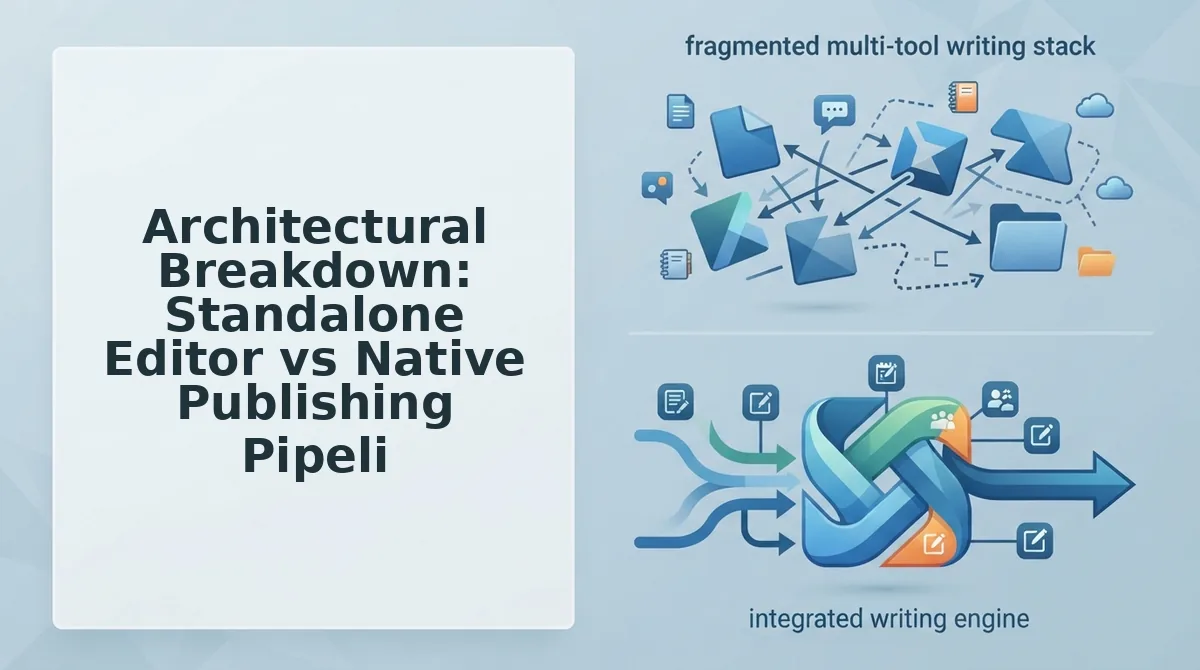
A native publishing pipeline is a system where the AI content engine connects directly to your CMS through an API or webhook, treating the CMS database, not a document editor, as the final destination for every article it produces.
Think of it like a conveyor belt in a bottling plant versus filling bottles by hand at a table. The conveyor belt moves the product to the crate automatically; the manual setup requires someone to lift, carry, and place every bottle.
Where Jasper Lives: The Standalone Editor
Jasper's architecture centers on a prompt-based document editor. The output is a text file, rich text or Markdown, that lives inside Jasper's interface. To get that content into WordPress, you either copy-paste it (losing formatting), use a browser extension (which still requires manual field configuration), or build a custom API integration yourself. Each path adds a middleware step: a human or a script must translate the document into CMS-ready structure.
Where Direct CMS Engines Live: The Native Pipeline
A direct CMS engine inverts that architecture. It pushes structured, optimized Markdown with media straight to the database through webhook-driven REST or GraphQL ingestion. The CMS receives the article already formatted: H2s and H3s intact, title tag populated, featured image attached, internal links mapped. No middleware, no translation step, no clipboard.
The practical consequence is measurable. Jasper requires separate extensions, custom API setups, or manual pasting; direct CMS engines ship the finished article as a database-ready payload. If you're unsure which CMS stack your site runs on, start by learning how to detect your CMS stack for content automation, the integration path depends on it. A platform that crawls your site, extracts brand voice, and publishes directly to WordPress removes the transfer layer entirely.
That transfer layer is where most teams lose more time than they realize, and the next section exposes exactly where those hidden costs pile up.
The Hidden Friction Points: Formatting, Metadata, and Image Uploads
Direct CMS integration eliminates the manual copy-paste loop that standalone generators like Jasper impose, but Jasper's editor gives writers granular control over tone and phrasing before content ever touches a CMS. The real cost difference shows up in formatting fidelity, metadata handling, and image placement.
Standalone generators break internal links, drop metadata, and force manual image uploads. Direct CMS engines generate structured Markdown, embed contextual media, and publish in a single automated loop through an automated blog publishing engine.
When you paste from a standalone editor into WordPress, headings can lose hierarchy, schema markup gets stripped, and category tags require manual assignment. Jasper's strength is that it lets you iterate on copy in a flexible canvas before committing to any platform. That flexibility becomes a tax when every article needs the same publishing treatment.
| Friction Point | Jasper (Standalone Editor) | Direct CMS Engine (BloGoose) |
|---|---|---|
| Image placement | Manual upload, manual alt text, manual positioning | Contextual media embedded automatically via automated blog image generation |
| Schema markup | Stripped on paste; requires separate plugin or manual JSON-LD | Injected at publish time with article, FAQ, and breadcrumb schema intact |
| Internal linking | Links break when pasted; anchor text often lost | Links mapped to live URLs during generation and preserved on publish |
| CMS category tagging | Manual selection per post | Assigned automatically from content cluster and pillar structure |
| Formatting fidelity | Headings, lists, and blockquotes can shift on paste | Structured Markdown converts cleanly to native CMS blocks |
Best for solo bloggers and multi-channel marketers: Jasper, when you need one flexible writing surface for social posts, ad copy, and occasional blog drafts across non-CMS surfaces.
Best for content teams publishing weekly or daily: A direct CMS engine, when every article must ship with correct schema, internal links, and featured images without a manual QA pass.
The copy-paste tax is measurable: each manual upload, link fix, and metadata entry adds 5-15 minutes per article. For a team publishing 20 posts a month, that is 2-5 hours of pure formatting labor that a direct integration removes entirely.
Evaluation Matrix: Feature Comparison for Content Teams
Direct CMS engines and Jasper serve overlapping but distinct workflows: Jasper optimizes for flexible, multi-surface copy creation, while direct CMS engines optimize for publish-ready, index-ready blog content. The table below compares them on the dimensions that matter most to content teams.
| Capability | Jasper | Direct CMS Engine (BloGoose) |
|---|---|---|
| Workflow steps from draft to live | Generate to copy to paste to fix formatting to upload images to add metadata to publish | Generate to auto-publish with formatting, images, metadata, and links intact |
| CMS support | None native; relies on manual export or third-party connectors | Native WordPress and custom API publishing as an AI blog writer for WordPress |
| Brand context integration | Manual brand voice setup and prompt maintenance | Automatic extraction from live site crawl, including tone, terminology, and formatting rules |
| Indexing readiness | Requires manual schema, sitemap, and metadata work post-publish | Schema, canonical tags, and metadata injected at publish time |
| Featured images | Manual sourcing, upload, and alt-text entry | Generated and embedded automatically with contextual alt text |
| Internal links | Manual mapping and insertion per article | Auto-mapped to existing site URLs during generation |
Direct CMS engines handle featured images and internal links automatically; Jasper requires manual asset uploads and link mapping. A worked example: publishing a 1,500-word pillar post with three internal links and one featured image takes roughly 10 minutes in a direct CMS engine versus 30-45 minutes in Jasper once you account for pasting, link verification, image sourcing, and metadata entry.
Best for agencies managing multiple client blogs: A direct CMS engine, because the AI blog generator direct WordPress publishing pipeline removes per-client formatting QA.
Best for brand teams producing varied collateral: Jasper, because its flexible editor handles ad copy, email sequences, and social variations that never touch a CMS.
Choosing the Right Setup: Standalone Copilot vs Autopilot CMS Engine
Your choice between Jasper and a direct CMS engine depends on whether organic search is your primary channel or one of many. Use this framework to match your team's publishing reality to the right tool.
- Choose a direct CMS engine if you publish 4+ blog posts per week. At that velocity, manual formatting, image uploads, and metadata entry consume hours that an autopilot pipeline eliminates. Use the engine's site crawl to lock in brand voice once, then let every article ship with schema and internal links intact.
- Choose Jasper if blog content is a secondary channel alongside ads, social, and email. Jasper excels at flexible, multi-channel marketing collateral, social snippets, ad variations, and brand campaigns across non-CMS surfaces. Its editor rewards teams that need one writing surface for many output types, not one optimized publishing loop.
- Choose a direct CMS engine if AI answer visibility matters. Citation-optimized formatting, FAQ schema, and clean structured Markdown are built into the publishing step. Jasper produces great prose, but you still have to manually retrofit the technical elements that AI answer engines cite.
- Choose Jasper if you need heavy human editorial intervention on every piece. Its canvas is built for iterative rewriting, tone shifts, and collaborative editing before anything goes live. Direct CMS engines optimize for throughput, not sentence-level polish.
- Choose a direct CMS engine if your team is one or two people. Solo operators and small teams cannot afford a manual publishing loop. An autopilot engine compresses research, drafting, optimization, and publishing into one workflow, which is the difference between shipping weekly and shipping daily.
- Choose Jasper if you already have a CMS workflow you love. If your team enjoys manual publishing, category curation, and image sourcing, Jasper's output fits that flow. Direct CMS engines replace that flow entirely, which is a feature only if you want the loop gone.
- Choose a direct CMS engine if brand consistency across dozens of posts matters. The markdown brand context vs Jasper comparison shows that extracted brand rules scale across every article automatically, while Jasper requires ongoing prompt maintenance to stay on-voice.
If your publishing bottleneck is the gap between a finished draft and a live, indexed post, the next section answers the most common questions about closing that gap.
Frequently Asked Questions About Direct CMS Integration vs Jasper
Direct CMS integration publishes finished articles to WordPress or Webflow in one automated loop, while Jasper requires manual copy-paste or third-party middleware like Zapier to reach your site.
Can you integrate Jasper directly into WordPress or Webflow without third-party middleware?
No. Jasper does not ship native WordPress or Webflow publishing. You must export content manually or connect Zapier, Make, or a custom API bridge to move drafts into your CMS. Direct CMS engines like BloGoose publish natively without middleware.
What are the main benefits of direct CMS integration for SEO?
Direct integration preserves heading hierarchy, schema markup, meta descriptions, and image alt text without reformatting errors. It also enables scheduled publishing and instant index ping, which reduces the time between content creation and search engine discovery.
How do direct publishing engines handle brand voice and internal links?
Direct engines crawl your existing site to extract tone, terminology, and formatting rules, then apply those rules automatically to every draft. Internal links are inserted contextually from your sitemap data, which strengthens topical clusters without manual link-building spreadsheets. Learn how to automate brand voice in AI blog posts.
Why does copy-pasting from Jasper break my blog formatting?
Copy-paste strips structured data, converts headings to plain text, and drops image embed codes. WordPress then reinterprets the content, often breaking lists, blockquotes, and internal anchor links. A native publishing pipeline sends structured Markdown or HTML directly, preserving the intended layout.
How do I switch from Jasper to a direct CMS publishing engine?
Connect your domain, let the engine crawl your sitemap and existing posts, then map your brand voice rules. Most direct engines import your content calendar and begin publishing within one setup session, with no prompt engineering or Zapier configuration required.
Final Verdict: Which Approach Fits Your Blog Workflow?
The contrast comes down to operational drag versus automated throughput. Jasper produces strong drafts but leaves publishing, formatting, metadata, and internal linking as manual chores that compound with every post. Direct CMS engines remove that friction by generating structured Markdown, embedding contextual media, and publishing directly to WordPress or headless endpoints in a single automated loop.
If your team publishes fewer than four posts monthly and has a dedicated editor, Jasper's flexibility works. If you need consistent, rank-ready clusters without stitching together five tools, the AI SEO content engine approach wins on total workflow cost.
Next step: connect your domain to BloGoose and let it crawl your site structure to generate a voice-accurate content calendar in one session. Your publishing bottleneck disappears the moment drafts stop living in a separate editor and start shipping themselves.